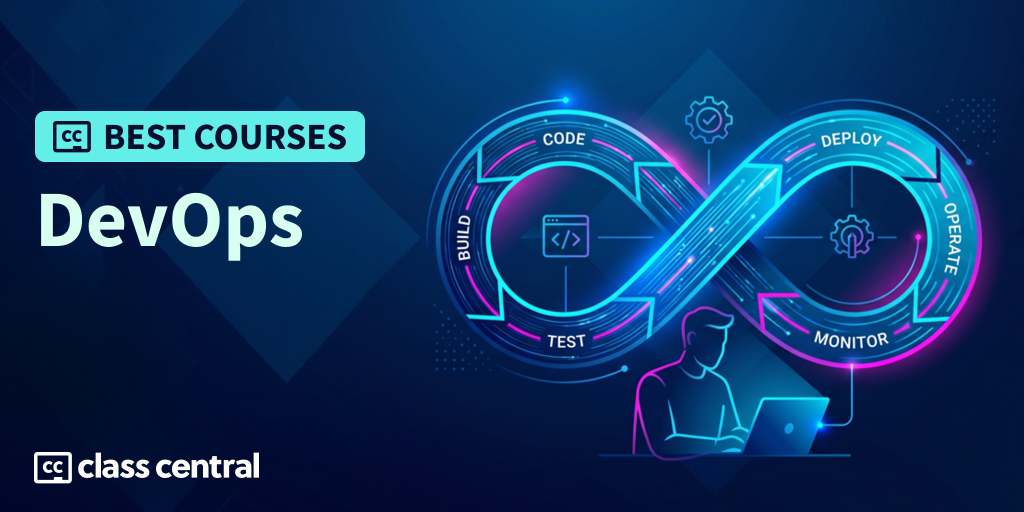

Most people learn DevOps backwards.
They start with tool names: Docker, Kubernetes, Jenkins, AWS, Azure, Prometheus. Then they get overwhelmed because DevOps is not one tool, one course, or one certification. It’s the practice of getting software from idea to production safely, repeatedly, and with enough feedback that teams can improve without burning out.
That’s why I built this guide around learning paths, not just famous tools. The best DevOps resources help you understand the whole delivery system: Linux, Git, scripting, CI/CD, containers, cloud infrastructure, monitoring, reliability, and the team habits that make releases less painful. And that’s exactly what I’ve scoured the Internet for!
Whether you are trying to land a DevOps role, move from software development into cloud work, prepare for SRE or platform engineering, or simply understand how modern software gets shipped, this Best Courses Guide (BCG) will have the right course for you.
Shortcuts
Why Learn DevOps?

Modern software teams need people who understand what happens after code is written. It’s not enough to build an app on your laptop; someone has to test it, package it, deploy it, monitor it, roll it back when things break, and help the team learn from incidents instead of repeating them. That’s the real reason DevOps matters: it teaches you how software actually reaches users.
The tools also show how common this work has become. In Stack Overflow’s 2025 Developer Survey, Docker was used by nearly 3 in 4 professional developers, Kubernetes by about 3 in 10, and Terraform by close to 1 in 5. Those are not random tools; they are the everyday language of modern DevOps, cloud, platform, and SRE work.
DevOps can also lead into well-paid roles. Glassdoor puts the typical U.S. range roughly between $116K and $180K, which shows DevOps skills tend to sit inside high-value infrastructure and delivery roles.
So yes, learning DevOps can help you move toward DevOps engineering, cloud engineering, platform engineering, or SRE. But the bigger payoff is that you stop seeing software as just code. You start understanding the full delivery system: source control, CI/CD, infrastructure, containers, monitoring, reliability, security, and feedback — the parts that keep real software running after it ships. If you want a more wholesome understanding of software development and architecture, then DevOps will open your eyes.
Why Trust My Picks?
Class Central, a Tripadvisor for online education, has helped 100 million learners find their next course. We’ve been combing through online education for more than a decade to aggregate a catalog of 250,000 online courses. We’re online learners ourselves: combined, the Class Central team has completed over 400 online courses, including online degrees. I have investigated courses and written BCGs for more than 80 topics for developers.
For this guide, I prioritized resources that solve clear learner problems:
- Structured for beginners: courses that explain DevOps without assuming you already know cloud, CI/CD, containers, or SRE.
- Hands-on practice: platforms and bootcamps that make you work in terminals, labs, projects, and cloud environments.
- Job-readiness: resources that help learners build confidence, prepare for interviews, or understand how DevOps teams actually work.
Now without further ado, let’s get on to my picks!
Best DevOps Courses





Best Free DevOps Crash Course (freeCodeCamp)
| Take if: |
|
- Rating: 26K Likes (1.1M Views)
- Duration: ≈2 hours
- Cost: Free

Interested in DevOps, but not sure what the work looks like day to day?
freeCodeCamp’s DevOps Engineering Course for Beginners is the best free sampler here because it grounds the role in three practical jobs: checking changes before they merge, releasing safely, and watching systems after users hit them.
Taught by Colin Chartier, it works best as orientation before you choose a longer course, bootcamp, or lab-heavy platform.
You’ll get a first look at:
- How automation supports code review: testing, linting, coverage, and CI as ways to catch problems earlier.
- How deployment strategies differ: why teams use rolling releases, blue/green deployments, containers, virtual machines, and autoscaling.
- Why production monitoring matters: logs and metrics help teams understand behavior after users touch the system.
- What DevOps engineers actually think about: not just shipping code, but reducing release risk and learning from runtime behavior.
Best for Hands-on Course Beginners With free Labs and Certificate (Google Cloud)

| Take if: |
|
- Duration: 38 hours
- Cost: Free (with learning credits)
There are four reasons why Google’s Cloud Computing Foundations Certificate is so high up this BCG:
- It’s official Google Cloud training, so you’re learning the platform from the people who built it, not from a random cloud crash course.
- It includes hands-on labs, so you actually use Google Cloud and get checkpoints as you progress.
- The skill badges and certificate of completion can then be shared on hiring platforms like LinkedIn and Credly for credibility.
- All of it — courses, labs, skill badges, and the certificate — is completely free!
That’s a strong deal for beginners: you get cloud basics, real console practice, and a free credential before moving into DevOps, SRE, Kubernetes, CI/CD, or monitoring.
You’ll learn:
- Cloud basics: what cloud computing is, where Google Cloud fits, and the basic services beginners need to recognize.
- Infrastructure in Google Cloud: compute, storage, and the core resources applications depend on.
- Networking and security: how cloud networks, access, and security controls help applications run safely.
- Data, ML, and AI basics: BigQuery-style data work, data pipelines, machine learning APIs, and where Google Cloud’s AI tools fit.
- Practical cloud tasks: create virtual machines, configure load balancers, set up an app development environment, build a secure cloud network, and prepare data for ML APIs.
Once you’re done with the basics, you can move on to Google’s other paths such as:
Best Free Short DevOps and SRE Foundation (Linux Foundation)
| Take if: |
|
- Rating: 4.6/5.0
- Duration: 10–12 hours
- Cost: Free (90d access)

Linux Foundation’s Introduction to DevOps and Site Reliability Engineering is the cleanest short starting point if you want the “why” before the tool stack — and what more, it’s completely free!
Fazlur Rahman Khan, a Technical Trainer, will help you build a mental map of DevOps: what it is, where SRE fits, why cloud changed software delivery, why containers matter, and how CI/CD, Infrastructure as Code, and observability connect.
In this text-based course, you’ll learn:
- How DevOps changes delivery: why teams care about speed, reliability, automation, and feedback.
- How SRE fits in: what reliability work looks like once systems are running in production.
- Why cloud and containers matter: how they changed deployment, capacity, and operational work.
- Why Infrastructure as Code exists: how repeatable infrastructure reduces manual work and environment drift.
- What observability is for: why logs, metrics, and monitoring matter after deployment.
Though there are interactive quizzes, the labs are PDFs to be followed along. So if you want more interactivity or an already set-up environment, pair this course with KodeKloud labs.
Want to get certified? The Linux Foundation has exams to prove your expertise to employers.
You can also take this course via edX.
Best Beginner DevOps with Career Certificate (IBM)
| Take if: |
|
- Rating: 4.6/5.0 (65K)
- Duration: ≈6 months
- Cost: Free preview / Free trial / Paid certificate

A lot of beginner DevOps advice assumes you already know how software gets from a developer’s laptop to production. IBM’s DevOps and Software Engineering Professional Certificate is for the learner who still needs that path explained from the ground up.
That’s why it belongs here. It doesn’t throw you straight into the ballpit. Instead, it first gives you the software-engineering base you need to understand the rest: how teams plan work, where code lives, how applications are built, how they are tested, and what has to happen before and after deployment.
What makes this certificate useful:
- You get a beginner-friendly runway: The early courses cover DevOps, cloud computing, Agile, software engineering, Git, and Linux, so you are not dropped straight into containers and deployment pipelines.
- You learn enough coding to understand the app itself: Python, shell scripting, Flask, APIs, and GitHub help you follow what is being built before you learn how to ship it.
- You see how modern apps leave your laptop: Docker, Kubernetes, OpenShift, microservices, and serverless show how applications are packaged, scaled, and run in cloud-style environments.
- You learn the work around a release: testing, behavior-driven development, CI/CD, application security, monitoring, and troubleshooting show the checks teams add before and after code goes live.
- You end with a DevOps capstone: You plan a small microservice project with user stories and a Kanban board, build a Flask service, test it, secure it, deploy it with Kubernetes, and automate the pipeline. How fun!
You can also take IBM’s shorter Introduction to DevOps first if you want to sample the teaching style before committing to the full certificate.
Best Hands-On DevOps Learning Path (KodeKloud)
| Take if: |
|
- Duration: Self-paced
- Cost: Paid subscription

KodeKloud’s DevOps Learning Path is the best hands-on pick in this guide.
Courses can explain DevOps, but DevOps confidence comes from doing the work: navigating Linux, writing scripts, editing YAML, using Git, building containers, configuring CI/CD, deploying services, and debugging when something breaks.
That’s where KodeKloud is strongest. It gives you a guided path, but the real value is the lab environment.
You’ll practice:
- Prerequisite skills: Linux, networking, Git, scripting, YAML, IPs, ports, SSL/TLS, and basic application concepts.
- DevOps fundamentals: how teams think about delivery, automation, reliability, and feedback.
- Tool workflows: containers, CI/CD, Kubernetes-style operations, automation, and monitoring.
- Real task practice: not just “watch me configure this,” but repeated hands-on work.
- Interview confidence: enough exposure to explain what you did, why it matters, and what can go wrong.
Most of the courses are paid. Fortunately, KodeKloud does have some free courses and labs, some of which I’d like to highlight are:
- Crash Course: AWS Basics
- Crash Course: Docker For Absolute Beginners
- Lab: Terraform for Beginners
- Lab: DevOps
Thus, even if you don’t plan on taking any of their course offerings, at the very least supplement your learning with the labs.
Best DevOps Operating Model Book (The DevOps Handbook)
| Take if: |
|
- Rating: 4.7/5.0 (3K on Amazon)
- Pages: 528
- Cost: Paid

If you can only read one book on DevOps, make it The DevOps Handbook (2nd edition).
Why? This paid book will help the rest of the field make sense. CI/CD, monitoring, deployment automation, infrastructure work, incident reviews, and platform teams become easier to understand once you see the workflow problems they are meant to solve.
By the end, you’ll understand:
- Why flow matters: long queues, big releases, invisible work, and handoffs slow teams down before tools even enter the picture.
- Why feedback matters: tests, telemetry, deployment signals, and incident reviews help teams catch problems earlier.
- Why DevOps includes security: security cannot be treated as a final approval step if teams want frequent, reliable delivery.
- How teams improve gradually: DevOps changes work habits, not just deployment scripts.
- How to talk about DevOps clearly: the book gives you vocabulary for developers, operations teams, managers, and business stakeholders.
Best Project-Based DevOps Bootcamp (TechWorld with Nana)
| Take if: |
|
- Duration: 4–6 months
- Cost: Paid

TechWorld with Nana’s DevOps Bootcamp is the best bootcamp-style option in this guide for structure and accountability.
Nana is popular because she explains DevOps tools without making beginners feel stupid. The paid bootcamp takes that teaching style and turns it into a longer project-based program, with Linux, Git, build tools, CI/CD, containers, cloud, Kubernetes, automation, monitoring, and portfolio work.
You’ll work through:
- DevOps foundations: Linux, command line, Git, build tools, and the workflow behind DevOps.
- CI/CD pipelines: how teams automate build, test, and release work.
- Container workflows: Docker, registries, and deployment patterns.
- Cloud and infrastructure: AWS-oriented project work and automation concepts.
- Monitoring and operations: production visibility, metrics, and alerting ideas.
Don’t want to spend a dime on courses? Don’t worry — TechWorld with Nana’s YT channel has uploaded tons of videos and playlists all involving DevOps concepts, such as Docker, Kubernetes, Kafka, etc. It’s a treasure trove of expertise that you definitely should check out.
Best Cloud DevOps Catalog (Pluralsight)
| Take if: |
|
- Duration: Self-paced
- Cost: Paid subscription

Pluralsight Cloud is the best broad subscription option in this guide.
It’s not a single DevOps course. It’s a paid catalog for learners who want cloud, DevOps, certification prep, and hands-on learning across multiple platforms. That makes it especially useful if your employer is paying, if you’re comparing cloud paths, or if you need to fill specific gaps.
The strength here is breadth:
- Cloud coverage: AWS, Azure, Google Cloud, and cloud-adjacent DevOps topics.
- Learning paths: guided sequences when you do not want to build your own curriculum from scratch.
- Hands-on labs: useful when videos are not enough and you need to try tasks yourself.
- Certification prep: helpful for learners working toward cloud or DevOps-adjacent credentials.
- Professional upskilling: a good fit for working engineers who need targeted learning rather than a beginner bootcamp.
Best DevOps Measurement Book for Teams and Leads (Accelerate)
| Take if: |
|
- Rating: 4.4/5.0 (3.5K on Amazon)
- Pages: 288
- Cost: Paid

Accelerate is the book to read when you want evidence behind DevOps, not just slogans.
It explains how high-performing technology organizations measure software delivery, what capabilities separate stronger teams from weaker ones, and why DevOps is not simply “move fast and automate everything.”
This is especially useful once you’ve learned the basic tools and start asking better questions: Are deployments actually faster? Are failures less painful? Are teams recovering quickly? Are technical practices helping the business, or just adding ceremony?
By the end, you’ll walk away with:
- Delivery metrics that matter: deployment frequency, lead time, change failure rate, and time to recovery.
- A better sense of priorities: why test automation, continuous delivery, architecture, team culture, and management practices affect outcomes.
- Less tool-chasing: a way to judge whether a practice improves delivery or just looks modern.
- A stronger argument for change: language for explaining why smaller releases, faster feedback, and better automation matter.
- A useful follow-up to hands-on learning: especially after you’ve seen real pipelines, deployments, and incidents.
This is best paired with a practical course for you to put what you’ve read into action.
Best Official AWS DevOps Training Path (AWS)
| Take if: |
|
- Duration: Self-paced
- Cost: Free + paid options
- Certificate: Exam separate

It should be a no-brainer that if your goal is AWS, then AWS DevOps Training is the best official path.
This is not the most beginner-friendly DevOps course in the guide, and it’s not trying to be. If the job you’re aiming for uses AWS, you need to understand how DevOps work maps to AWS services, AWS deployment models, AWS monitoring, and AWS certification paths.
Take this course when you want to connect DevOps concepts to AWS practice:
- Deploying applications: how AWS services support release pipelines and cloud application delivery.
- Managing environments: how AWS structures infrastructure, permissions, services, and operational workflows.
- Monitoring applications: how AWS services help teams detect problems, trace behavior, and respond to issues.
- Certification direction: where DevOps Engineer-oriented AWS training fits into the broader AWS certification path.
- Cloud-specific judgment: what changes when DevOps work happens inside a real cloud provider.
This is best after a foundation course or some hands-on practice. If you are still learning what CI/CD, containers, or monitoring mean, start with IBM, LFS162, freeCodeCamp, or KodeKloud first.
Best Official Azure DevOps Engineer Path (Microsoft Learn)
| Take if: |
|
- Duration: Self-paced
- Cost: Free
- Certificate: Separate paid exam

Likewise, if you’re aiming for Microsoft Azure then Microsoft Learn’s Training for DevOps Engineers is the best official option for you.
Microsoft’s DevOps path is useful because it treats the role as more than pipeline configuration. It covers collaboration, source control, infrastructure, security, compliance, continuous integration, testing, delivery, monitoring, and feedback.
That makes it especially relevant for enterprise teams, where DevOps often includes governance, security, release policies, and cross-team coordination.
You’ll use it to understand:
- Azure DevOps responsibilities: what Microsoft expects a DevOps engineer to know and do.
- Source control and delivery: how code moves through repositories, builds, tests, and releases.
- Security and compliance: why enterprise DevOps work includes more than “ship faster.”
- Monitoring and feedback: how production signals feed back into engineering decisions.
- Certification readiness: how Microsoft positions the path toward DevOps Engineer certification.
Some Azure practice may require an Azure subscription, keep that in mind.
Bonus Resources
Here are some miscellaneous resources that I found useful while researching this BCG:
- roadmap.sh DevOps Roadmap: Keep this open while studying so you can tell what you’ve actually practiced versus what you’ve only heard mentioned.
- TechWorld with Nana videos: Her content is worth mentioning twice in this article. Nana has tons of videos about various DevOps tools and concepts. If any of the resources are too fast for you, use this to slow down and digest.
- Awesome DevOps: Helpful after you start building projects and need to see what people commonly use for deployment, monitoring, logging, alerts, and incident response.
Did this guide help? We’ve got 200+ more for you. Check our Best Courses Guides to find your next course!
The post 11 Best DevOps Courses for 2026: From Coding to Reliable Delivery appeared first on The Report by Class Central.