
Search is deceptively simple: find an item in a collection of items. Yet the engineering behind searching vast amounts of data efficiently, like what happens when you query Google or search for products on Amazon, is anything but simple.
Ever wonder what happens when you search for courses on Class Central? Behind the scenes, Elasticsearch is working to instantly scan through our database of 250,000+ courses, matching your query against course titles, descriptions, and metadata to surface the most relevant results in milliseconds. We’re not alone—companies like Uber, Netflix, and GitHub rely on Elasticsearch to power their search and analytics infrastructure.
The Evolution of Elasticsearch
Lucene is one such general-purpose search engine library. It was created by Doug Cutting in 1999 (as his fifth search engine!) and later became an open source project of the Apache Software Foundation. Since Lucene is a fairly low-level library, Solr was created by Yonik Seeley in 2004, alongside Lucene, as another Apache open source project, to make it easier to build applications based on Lucene. That same year, Shay Banon created Compass, also based on Lucene, which, around its third version and after an extensive rewrite of the source code to accommodate scalable distributed capabilities, became the first version of Elasticsearch in 2010.
I wanted to provide this brief introduction to demonstrate the ramifications of Elasticsearch’s place in the mainstream search engine scene.
Licensing and the OpenSearch Fork
Initially, Elasticsearch operated under an Apache 2.0 license, but around 2021 things got complicated in this regard. Elastic went through a lot of trouble during a dispute with Amazon Web Services over offering Elasticsearch as a managed service to AWS customers. The end result was a fork as OpenSearch from AWS and a relicensing of Elasticsearch to be dual-licensed under the SSPL and Elastic License.
What Elasticsearch Offers Today
Elasticsearch has come a long way and offers many powerful features, not just full-text search as it did in the beginning, but also analytics, vector databases for AI search, and more.
It can aggregate web logs from web servers, visualize numerical data, or time-based data. From the beginning, it offered RESTful APIs, high availability, scalability, and fault tolerance.
The Elastic Stack
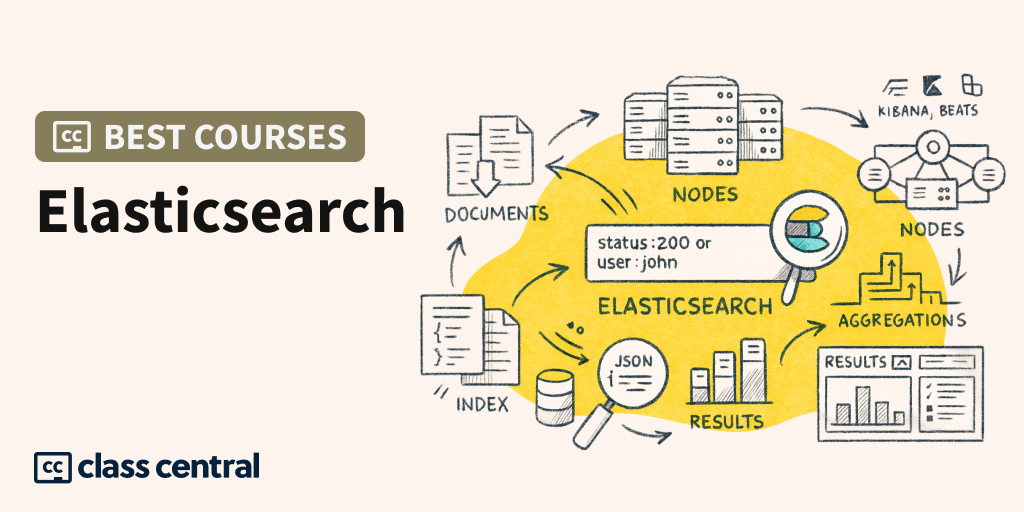
It works more like a stack of three popular projects, Elasticsearch, Logstash, and Kibana, but with the later addition of Beats to this famous stack. Elasticsearch is a distributed search and analytics engine built on Apache Lucene, Logstash is an open source data ingestion tool that allows you to collect data from various sources, transform it, and send it to the desired destination, and Kibana is the default choice for visualizing data stored in Elasticsearch.
Fun fact: Solr, Opensearch, and Elasticsearch all run on Lucene and the Java Virtual Machine.
Now that you have some basic understanding of what Elasticsearch is, let’s explore the best courses to master it.
Best Elasticsearch Courses





Foundations of Elasticsearch (Packt)
- Level: Beginner
- Duration: 6 hours
- Cost: Free trial
- Certification: Yes (Paid)

This course takes a programming language agnostic approach, meaning it will teach you how to build HTTP requests and parse responses from Elasticsearch in a meaningful way, and in doing so, you will be able to easily transfer your knowledge of Elasticsearch to any programming language, on any system, that you want.
The authors emphasize that the focus of the course is on the actual HTTP requests and responses, and not on the details of how to do this from a very specific programming language. Curl is the tool used to interact with the Elasticsearch server. The course will show you how to set up an environment and get started.
There are good explanations of concepts such as indexes, shards, and the analogy between Elasticsearch and a database and how they differ as they serve different purposes. Did you know that the main scaling trick of Elasticsearch is that an index is divided into what we call shards, and each shard is basically a self-contained instance of Lucene itself? When I was trying to learn to use Elasticsearch, I remember there was no such course and I ended up using the documentation provided by the Elastic team. I found it to be very detailed but not very good at explaining these concepts to a complete beginner like me.
The quiz at the end of each module is more like a review of the concepts, as the instructor asks you a question and helps you review by explaining the concept again in a short enough way.
The course is heavily focused on practical activities: how to import, search, and analyze big data with Elasticsearch in many different ways. It is structured in three modules, the first one walks you through the installation and general functionality, the second one literally walks you through the indexing and mapping functions using a real Movie Lens dataset, and the last module shows you how Elasticsearch is designed for search: phrase matching, pagination, sorting, filtering, partial matching, n-grams.
By the end, you will have implemented a basic search in Elasticsearch using an interactive dialogue with an AI-powered learning assistant, a full course practice assessment, and a full course evaluation.
This course is the first in the Elasticsearch 8 and Elastic Stack: In-Depth and Hands-On Specialization suite, with subsequent courses in the package focusing on deeper and more practical specialization, as well as data integration and visualization.
The instructor for this course is Frank Kane, a former Amazon Senior Expert who now runs his own company, Sundog Education, and teaches another course on Udemy about Elasticsearch for the newer version, version 9. We cover that course below as well.
Complete Guide to Elasticsearch (Udemy)
- Level: Beginner
- Duration: 13 hrs
- Cost: Paid
- Rating: 4.6 (29K)

This course has very good reviews on Udemy. The course is led by Bo Andersen, a software engineer from Denmark with extensive experience in backend web development who moved into data analytics and worked in the world of online marketing startups.
The instructor is not alone in claiming that the Elastic documentation is too detailed, and is actually more of an API reference than a guide to learning the Elastic Stack, hence his course and many others that try to fill the gap for beginners.
The course focuses only on Elasticsearch, as the material is vast and going into detail would not be possible otherwise.
The instructor covers the rest of the Elastic Stack with two other courses that you can also find on Udemy, called Data Visualization with Kibana and Processing Data with Logstash (and Filebeat).
In this course, you will learn how to write complex queries based on data from Elasticsearch. All the queries and commands he uses for the course are available in his public github repository.
I especially enjoyed the “Introduction to Elasticsearch” video to learn about the many use cases where using Elasticsearch makes sense. The instructor provides an effective overview of the Elastic Stack before delving into the inner workings of Elasticsearch.
Executing Full Text Queries with Elasticsearch (Board Infinity)
- Level: Beginner
- Duration: 14 hours
- Cost: Free trial
- Certification: Yes (Paid)

Compared to the previous course, Foundations of Elasticsearch, I found that Executing Full Text Queries with Elasticsearch goes a little deeper into full text search concepts.
This course is structured in three modules. The first module introduces the learner to the Elasticsearch architecture, how to configure the stack and then delves into full text queries. Module 2 introduces more advanced topics such as fuzzy search, optimizing for search result relevance using the scoring algorithm, improving query performance with filters and caching, extracting multiple patterns using the multi-match query mechanism. Module 3 takes the topic even further by introducing custom attributes for queries, showing how to join and merge queries.
The instructor recommends Elastic Cloud over installing Elasticsearch on your local machine, which saves you a lot of headaches, but it comes with a free trial from Elastic. Last time I checked it was 14 days, so it might end up being more expensive than setting up your own environment. The course shows you how to set up an Elastic environment on GCP, and the instructor uses the development tools provided with the platform to run Elasticsearch queries. At the end of each module there is a graded assignment to assess progress and provide feedback.
Elasticsearch 9 and the Elastic Stack: In Depth and Hands On (Udemy)
- Level: Some familiarity with Linux, webservices and REST is helpful
- Duration: 14.5 hrs
- Cost: Paid
- Rating: 4.5 (6.4K)

Elasticsearch versions 8 vs. 9 don’t differ much in terms of features, but at first glance the two courses seem very similar (compared to the Foundations course by Packt on Coursera at the top) and I assume that only the peculiarities related to the Elasticsearch versions prevail. Expect about the same result as with Elasticsearch version 8 for this course.
This course spans several hours, because instead of being divided into three courses, it is offered as a single course, over the course of almost 14.5 hours. Frank Kane has extensive experience in both software engineering and teaching, after a long career at Amazon and IMDB, where he led engineering teams and used Elasticsearch extensively.
As the author said, this course is aimed at any technology professional tasked with fast and scalable search and analysis of large data sets. Elasticsearch addresses more problems than just simple search, it allows you to analyze indexed data and use it as a very powerful alerting and monitoring tool.
Complete Elasticsearch Masterclass with Logstash and Kibana (Udemy)
- Level: Beginner
- Duration: 6 hrs
- Cost: Paid
- Rating: 4.7 (8.3K)

This course has very good reviews, concise videos, at least the ones I saw in the preview.
The downsides to this course are that it is somewhat outdated as it deals with Elasticsearch 6, currently version 9 is available. But don’t let that put you off, I myself am used to version 6. Version 7 is when Amazon forked Elasticsearch to what is now the Opensearch project. The Elastic company went further and came up with the dual license for Elasticsearch.
The internal workings of Elastisearch are the same regardless of the versions. Newer versions have more sophisticated features and you can quickly learn them yourself using the reference documentation.
The instructor is Job Ready Programmer Imtiaz Ahmad and it was a pleasure for me to listen to this guy present. I watched the free preview videos and I was impressed with the way he explained the concepts of shards, nodes and index, very basic with “Sorry for the drawing” but very effective, no one could miss the explanations, they are detailed and to the point. I highly recommend this course.
Set Up an Elastic Stack on GCP Step By Step Tutorial (NBGLink)
- Level: Beginner
- Duration: 1 hr
- Cost: Free

This is a free step-by-step video tutorial that walks you through setting up an entire Elastic Stack on Google Cloud Platform (GCP).
The instructor uses the minimum requirements for the type of virtual machines you chose on the GCP platform, as this is a playground environment, and creates 2 nodes for Elasticsearch, one node for Logstash, and one for Kibana. The tutorial shows how to set up endpoints on GCP and configure a Beats file to load an Apache log file from a remote source into the Elastic Stack playground and visualize the data using Kibana functions.
It may take you more than an hour to follow the hands-on tutorial, but it gives you the necessary clues on how to approach such a setup. Similar steps can be easily followed on other cloud platforms if you are familiar with it. This is a tutorial that shows you how to set up an Elastic stack, quickly and to the point, but it will not teach you anything specific about using Elasticsearch for queries and so on.
I recommend videos like this if you choose the self-learning method, discovering Elasticsearch, as many on Reddit recommend: install Elasticsearch, experiment with it, push it to the limit, test it. There is a lot to learn from all these attempts, and based on your experience with the Elastic API reference, you can ultimately learn a lot, at least that was the path that all the Elasticsearch course instructors followed.
Finish the setup by consulting the definitive Elasticsearch guide and you are good to go.
Miguel Grinberg Full Text Search with Flask and SQLALchemy
- Level: Intermediate
- Duration: N/A
- Cost: Free
- Type: Project, Hands-On learning

I mention this tutorial because that’s how I got my first steps with Elasticsearch, working on a web application where I had to integrate functionality from a search engine. If you’re a developer and need to integrate your work with Elasticsearch, this could be useful regardless of your stack, but in this article we’re talking about integrating Python, SQL Alchemy, and Elasticsearch.
In the Complete Guide to Elasticsearch course we discussed above, Bo Andersen talks about this use case where you need to map the contents of your web application’s database to an Elasticsearch index, and this is a concrete example of how you can do this. The challenge is that with every CRUD operation on the database, the necessary adjustments need to be made to the Elasticsearch infrastructure.
This tutorial walks you through all the steps needed to install the required libraries for Elasticsearch, how to create indexes, how to search them, how to create a Full Text Search abstraction in your web application models, and how to integrate it with SQL Alchemy Object Relational Mapping so that you can keep your Elasticsearch data consistent during every database CRUD operation. Finally, the author demonstrates how to add a search web form to your website that successfully uses Elasticsearch data.
I highly recommend this tutorial to learn how to add Elasticsearch to your web application backend. Miguel Grinberg is one of the famous bloggers on the Flask web microframework, a very skilled open-source contributor, and since the last year or so, coincidentally or not, he has been working for the Elastic company.
Elastic Training (Elastic.co)
- Level: Beginner
- Duration: N/A
- Cost: Free

Elastic offers a variety of training courses on a variety of topics, some free, self-paced, and some instructor-led. If you’re starting a course, they offer a Google Cloud-based environment where you can experiment with the different elements of the stack. Give it a try, and keep their reference documentation handy as a supplementary manual when taking the courses or working with the Elastic Stack on various topics.

The post Best Elasticsearch Courses in 2025 appeared first on The Report by Class Central.