This MSI Prestige Series laptop review is sponsored by MSI
When it comes to buying a new Windows laptop, the selection can feel overwhelming until you narrow your search to MSI. Best known as the world’s leading gaming brand for mighty gaming machines, MSI Prestige Series laptops are masterpieces of engineering and materials.
The company has used their knowledge of high performing computer hardware and packaged components with impressive specs to create the MSI Prestige Series. This ultra-slim, extremely powerful line of laptops should not be overlooked.
MSI Prestige Series Laptop Review

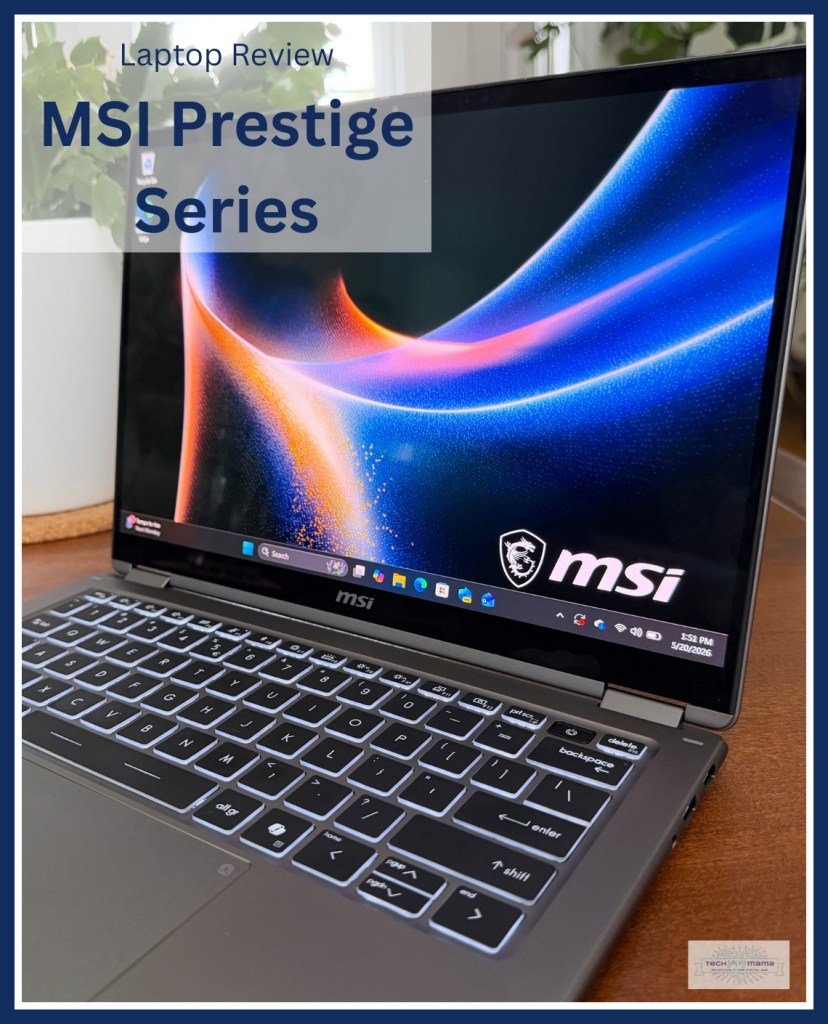
I’ve had the pleasure of using the Prestige 14 Flip AI+ over the past two months. Part of the MSI Prestige series, this gorgeous machine makes an excellent choice for college students or those who work at home or on the go. The TLDR is it features impressive specs in an extremely portable footprint and performs well, even during extreme multitasking. Keep reading if you want to why the Prestige 14 Flip AI+ makes a great choice if you’re shopping for a new laptop.
Build Quality of the Prestige 14 Flip AI+

Immediately upon unboxing, the Prestige 14 Flip AI+ takes your breath away. The platinum gray aluminum alloy is stunning. The build quality is sturdy yet refined thanks a seamless exterior, smooth edges, and fluid curves. Beautifully designed hinges open and close with ease and are built to withstand being opened and closed multiple times a day for the life of the laptop.

MSI built this machine to be highly portable. Slim aluminum alloy helps the Prestige 14 Flip AI+ be thin and lightweight. The entire laptop is substantially thinner than a MacBook Pro and weighs in at under 3 pounds.
Prestige 14 Flip AI+ Keyboard and Screen

The Prestige 14 Flip AI+’s keyboard is backlit which is a thoughtful and unexpected feature. This makes it useful for the airplane, a dorm room, or working from the couch/bed in dim light. Another nice touch is the mute button has a dedicated light on it that remains on when the system is muted.
The velvet-touch feature makes the keyboard pleasing to type on thanks to responsive keys. UV-cured fingerprint and smudge-resistant keycaps help the keyboard stay cleaner and look more pristine, regardless of how much you’re using your laptop.

The Prestige 14 Flip AI+ features a beautiful 14-inch OLED touchscreen (1920×1200). If you are not familiar with OLEDs, they are extremely high-quality displays known for their vivid colors, true blacks, and overall amazing image quality. More on the screen below.
The system boasts a massive trackpad, about half the size of the keyboard itself, centered below the spacebar. It comes with MSI software drivers to customize actions and gestures to quickly navigate your system. I did not find it to be in the way while typing, and in case you’re worried about phantom mouse clicks, my wrists didn’t trigger them.

Tech Specs of the Prestige 14 Flip AI+

MSI Prestige 16 Flip AI+ C3M features a 24 hour real-battery life with up to an Intel® Core Ultra X9 processor
In my 10 Things to Look for When Buying a Laptop, I wrote about the importance of understanding your computing needs and selecting a machine with tech specs to match. On one end of the spectrum are big, powerful machines marketed to gamers and on the other, there are lower priced machines with questionable build quality.
The Prestige 14 Flip AI+ has tech specs to meet your needs for years to come whether you’re a college student or commuting professional.
The system comes with 32GB of RAM for people who are serious about multitasking. RAM is needed to help your laptop multitask and move between tasks like editing a document, streaming a video, and switching between browser tabs quickly. Think of the browser tabs you could open!

For processing, the Prestige 14 Flip AI+ packs an Intel Core Ultra X7 Processor (CPU), for lots of power on-the go. For the technical people, that’s 16 cores typically running at 1.9GHz, capable of bursting up to 4.8GHz in an ultra-slim laptop, weighing in at 2.87 lbs. Pretty amazing!
The Prestige 14 Flip AI+ has another trick up its sleeve- the SSD isn’t soldered to the motherboard. This allows you to replace it with a 3rd party M.2 SSD should you need more storage in the future. For a machine this small, this is an unexpected feature.
Many manufacturers such as Apple, have been soldering components to the main board for years. Perhaps due to MSI’s history in building gaming machines, they realized people might want upgradability. I appreciate that they managed to achieve storage upgradability in such a small package.
For graphics, the MSI Prestige 14 Flip AI+ comes with integrated Intel ARC Graphics. Serious gamers may be disappointed by this, but with the power packed in this laptop, there is literally no way to put a discrete graphics card in this form factor. Intel ARC graphics is truly sufficient, unless you are a hardcore gamer or college engineering student who needs to run SolidWorks.
How Hot Does this Laptop Get?

If you’ve had experiences with powerful machines that are hot to touch or not being able to hear Zoom participants over the loud disruptive fans, that’s not the case with the Prestige 14 Flip AI+.
MSI used the Vapor Chamber Cooler technology from their gaming machines in this laptop to dissipate heat in a fast, even, and efficient way. The Prestige 14 Flip AI+ features an advanced thermal design with dual fans that help it maintain stable temperatures and consistent performance in a “near-silent” way.
“Near-silent?” According to MSI’s specifications, the Prestige 14 Flip AI+ generates 18dBA when you are in a video call or streaming, and only 26dBA maximum when fully loaded in balanced performance mode. But how quiet is that?
After Googling those dBA levels, both measurements fall around the range of whispering, so I suppose you really could call this laptop “whisper quiet.” During testing, I pushed the Prestige 14 Flip AI+ pretty hard during this review by requiring it to do a lot of tasks at once. Fans remained quiet and the bottom of the laptop was only slightly warm.
The Flip Part of the Prestige 14 Flip AI+

While I mentioned the 14-inch touchscreen OLED above, it’s important to explain that the nearly-frameless edge-to-edge display also fully opens 180 degrees, turning your ultra-slim laptop into a tablet.

The integrated stylus is built into the bottom. It charges via a magnetic connection and releases by sliding the tab.

Tablet mode allows you to run Windows Tablet Mode in addition to just using it as a laptop. This is what the industry calls a 2-in-1 laptop. This puts it head-to head with the Lenovo Yoga line and other flip laptops.

As a side note, for frequent travelers, flight attendants make you put your laptop away before landing but seem to allow tablets. In my personal experience, the deciding factor is whether your device has an attached keyboard. If you’re watching a movie or finishing an important email on the plane, you could flip the laptop into tablet mode, so it looks like a tablet. This would allow you to get another 20-30 minutes of device use. It might seem like a silly trick, but it works!
Prestige 14 Flip AI+ Battery Life

A laptop’s battery determines whether it lives up to the promise of portability. The Prestige 14 Flip AI+ boasts an 81-watt-hour battery, promising up to 30 hours of real-battery life. MSI tests real-world battery by continually playing video on a laptop to gauge battery life.
When you do need to charge, MSI Prestige Series supports USB fast-charging with the included power supply.
Prestige 14 Flip AI+ Built-In Ports

Say goodbye to your bag of dongles because the most commonly used ports are built into the base of the Prestige 14 Flip AI+. This includes a
- Full-size HDMI port
- 2 full-size USB 3.2 Type A ports
- Headphone/microphone jack
- 2 Thunderbolt 4 / DisplayPort
The 2 Thunderbolt 4 / DisplayPort ports also serve as charging ports. Thunderbolt 4 is the spec explaining the powerful capabilities of these ports, but from a physical “what cable do I need?” standpoint, these are USB-C connectors.

If you are someone who likes to connect a large external monitor to your laptop when working at home or the office, the Thunderbolt 4 ports can drive two massive monitors, a keyboard, mouse, and more with a Thunderbolt dock. This gives you big-screen power at your desk and uncompromised work-on-the-go performance when mobile. I plugged the Prestige 14 Flip AI+ into my home Thunderbolt dock with a 32-inch QHD monitor and it immediately connected to everything flawlessly.
I wanted to push the system further, so I added another 32-inch QHD monitor on the other Thunderbolt port and had each monitor streaming HD YouTube videos (concerts on the left, videos on the right).
On the laptop screen itself, I opened about 10 tabs and then started watching YouTube shorts. I had 2 QHD monitors running at 2560×1440 streaming YouTube content while using the laptop as a for web surfing and watching shorts. The Prestige 14 Flip AI+ was running on battery the entire time.
Other Features of the MSI Prestige 14 Flip AI+

Another sign of a quality laptop is the charging adaptor. Sometimes manufacturers make a great laptop and throw in a cheap massive power brick. The MSI Prestige 14 Flip AI+ comes with a very compact square power charger (65 watts) with a USB-C connector about the size of a hockey puck. This means you can charge your USB-C phone with the adaptor. You can also borrow friends’ USB-C charging cables from other PCs and non-mag-safe MacBooks.

The MSI Prestige 14 Flip AI+ comes with a fingerprint reader, but you may not even use it. The built-in WebCam supports facial recognition so your laptop just unlocks before you even touch the keyboard.

The integrated 1080P webcam for facial recognition and web conferencing even has an integrated physical shutter for privacy so you can physically cover the camera with a visible red circle so you know it’s not in use.
For WiFi, the MSI Prestige supports the absolute latest WiFi 7 standards, providing for real-world WiFi speeds of up to 1GBps or even better if your home router is also WiFi7.
The Prestige 14 Flip AI+ D3MG I reviewed, featured an Intel Ultra X7 (358H) processor, 32GB of ram and a 1 TB SSD. This configuration is the version I would have selected for myself given my current computing needs.
This laptop has enough RAM for serious multitasking and enough storage for photos and videos. As expected, it comes with Windows 11 Home or Pro and is categorized as a Copilot+ PC with an integrated neural processing unit (NPU) and a dedicated Copilot key on the keyboard.
Prestige 14 Flip AI+ Review Summary

The MSI Prestige 14 Flip AI+ laptop is an excellent choice for people who need to work at home or on the go. This gorgeous machine has impressive specs in an extremely small and portable footprints and performs well, even under extreme multitasking.
I was provided with a MSI Prestige 14 Flip AI+ for review. However, this model is currently sold out in the United States. Look for the MSI Prestige 16 Flip AI+ at Newegg and the Prestige 16 AI+ at Costco ($1,799.99).
The post MSI Prestige Series Laptop Review appeared first on Tech Savvy Mama.